
An Apigee developer portal is the self-service front door to an Apigee X org — the page where a developer signs up, reads the reference docs, generates a key, and starts calling an API without waiting on a support ticket. For a platform team, that page decides whether an API that shipped internally ever gets used by anyone outside the org.
Most teams don’t design one from a blank page. They start with whatever Apigee provisioned for them, or they hand the requirement to a web team that reaches for Drupal because that’s what the last CMS project used. Both are legitimate starting points. The problem is that neither was built with your specific org, your SSO provider, or your release calendar in mind — and the gap between “it works in the demo” and “developers actually use it” is where most portal projects stall.
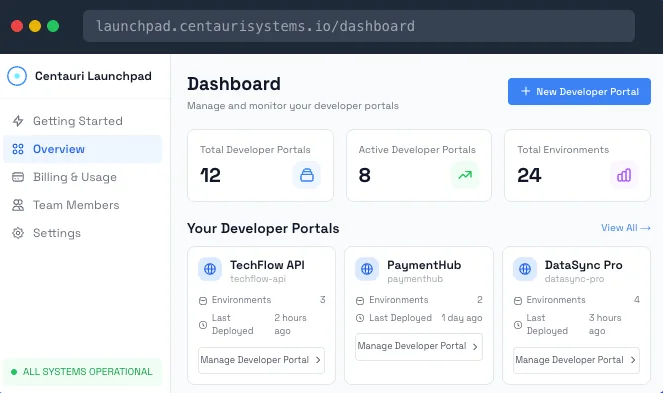
How an Apigee developer portal works
A working portal does four things, in order, every time a developer visits it.
- Authenticate them — SSO against your identity provider, or a self-service signup if the API is open to outside partners.
- Show them what’s callable — reference pages generated straight from the OpenAPI spec, not hand-written and left to drift out of date.
- Issue and scope a key — role-based access control decides which products a given developer or team can see and call, without an admin approving every request by hand.
- Report back — usage, errors, and quota status per developer, so the platform team can see adoption instead of guessing at it.
The portal sits in front of Apigee X, not inside it. It reads the spec and the analytics Apigee already produces, and presents both as something a developer can use without touching the underlying config.
Apigee’s built-in Drupal integrated portal
Apigee X ships with its own option for this, usually called the integrated portal — a Drupal instance that Google provisions and hosts alongside your Apigee org, themed and configured from the Apigee UI rather than stood up as a separate project. For a lot of teams it’s the first portal they ever have, and for a while it’s enough: it’s already connected to your org, it renders your API products, and nobody had to write a procurement request to get it.
The friction shows up once the requirements move past the default template. Branding beyond the supplied theme options means working in Drupal directly, which puts you back in “who owns this CMS” territory even though Google is hosting it. Running more than one Apigee org means a separate integrated portal per org, styled and maintained independently. And because it’s still Drupal underneath, it inherits the same long-run question as any other Drupal property: who’s tracking module and platform updates once the person who set it up moves to a different project.
None of that makes the integrated portal a bad starting point — it’s the right call for a single org with modest branding needs. It stops being enough at the same points a custom Drupal build does: multiple orgs, real white-labeling, or a support load that’s outgrown what a shared CMS was built to carry.
Apigee integrated portal vs. custom Drupal vs. Launchpad
Most of the build-vs-buy decision comes down to what happens after the first version ships, not what it takes to get a demo working.
| Apigee’s integrated portal | Custom build on Drupal | Packaged Apigee portal (e.g. Launchpad) | |
|---|---|---|---|
| Time to first portal | Fast — provisioned with the org, themed from defaults | Typically months — theming, auth, and API-doc integration are separate projects | Built from your OpenAPI spec, with a target of 48 hours to a first deploy |
| Branding control | Limited to Drupal theming within the hosted instance | Full control, built by hand | Configured to your brand as part of setup |
| SSO and role-based access | Supported, configured per portal | Built and maintained by hand, per project | Configured against your identity provider as part of setup |
| Multiple Apigee orgs | One integrated portal per org, managed separately | Usually rebuilt, org by org | Multi-org support out of the box |
| Keeping pace with Apigee releases | Google-managed, but still Drupal underneath | Falls to whoever still owns the Drupal instance, if anyone does | Tracked and maintained as part of the product |
The common thread across the first two columns is Drupal. One version of it is hosted by Google and themed inside Apigee’s own UI; the other is a general-purpose CMS a web team stood up and pointed at your API spec. Both are capable, well-understood tools. Neither was purpose-built for the specific job of fronting an Apigee org across multiple environments, which is the gap a packaged portal like Launchpad is built to close.
Migrating an existing Apigee developer portal
A portal built years ago — whether that’s a Drupal instance nobody currently owns or an integrated portal that’s outgrown a single org — isn’t a reason to avoid changing it. It’s usually the reason to. The developer-facing pieces that have to survive a migration are the ones that break trust if they don’t: existing API keys keep working, existing documentation links don’t 404, and current users aren’t asked to re-register. Centauri Systems’ migration work spans over 2 billion API calls moved across engagements, which is mostly a description of how unglamorous a well-run migration should be — nothing a developer notices, because nothing broke.
Who needs a dedicated Apigee developer portal
Not every Apigee X org needs one beyond the default integrated portal on day one. It tends to matter once one of these is true:
- Outside partners or customers, not just internal teams, need to discover and call your APIs.
- You’re running more than one Apigee org — by region, business unit, or environment — and want developers to see one consistent front door instead of a separate Drupal instance per org.
- An existing portal, integrated or custom, was set up years ago and nobody is specifically assigned to it, which makes it a risk every time Apigee ships a release.
- Onboarding a new developer currently takes days of back-and-forth instead of a self-service signup.
If none of those apply yet, the integrated portal that ships with the platform is probably enough for now. A dedicated portal earns its cost once the number of people trying to use your APIs outgrows what a shared, default CMS instance was built to handle.
What it takes to launch an Apigee developer portal
The fastest path starts with the artifact you likely already have: an OpenAPI spec. From there, branding, SSO, and role-based access get configured against it rather than built from scratch in Drupal, and the portal deploys to your own domain on your own Apigee X org. That’s the same discipline behind why most launches die after launch week: a system nobody is accountable for after it ships tends to quietly stop working, and a developer portal — integrated, custom, or packaged — is no exception. What matters isn’t only the first deploy; it’s who’s still responsible for the portal in month six.
Bring an OpenAPI spec
The clearest way to evaluate an Apigee developer portal is to see one built from your own spec, not a demo environment with placeholder data. Centauri Systems can build a branded portal from your spec in about fifteen minutes of setup — book a demo to see it running against your own org, or talk to MG if you’re not yet sure whether this is a Centauri engagement or something broader.
Figures on migration volume, uptime, and deploy times are as published by Centauri Systems at centaurisystems.io.
FAQ: Apigee developer portal, in plain terms
What is an Apigee developer portal?
An Apigee developer portal is the self-service front door to an Apigee X org — where a developer signs up, reads the API reference, and generates a key without a support ticket. It can be Apigee’s integrated Drupal instance, a custom build, or a packaged product like Launchpad.
How does an Apigee developer portal work?
It reads your OpenAPI spec and Apigee’s own analytics, then presents both as one self-service flow: sign-in against your identity provider, auto-generated reference docs, scoped API keys, and per-developer usage reporting — without anyone touching the underlying Apigee config.
Apigee integrated portal vs. custom Drupal build — which do we need?
The integrated portal suits a single org with light branding needs. A custom Drupal build adds full control but adds a maintenance owner. A packaged option like Launchpad fits teams running more than one Apigee org that want one consistent portal without owning a Drupal instance.
How long does it take to launch an Apigee developer portal, and what does it cost?
Cost and timeline depend on the path: the integrated portal ships with your org at no extra cost, a custom build typically runs months of web-team time, and a packaged build like Launchpad targets 48 hours to a first deploy from your OpenAPI spec. Talk to MG for a number scoped to your setup.
FAQ: Apigee migration partner, in plain terms
What is an Apigee migration partner?
An Apigee migration partner is the outside team that moves an existing API estate onto Apigee X without breaking live traffic, active keys, or developer sign-ins during the cutover. Centauri Systems fills that role for platform teams who’d rather not run a first migration alone — its work spans over 2 billion API calls moved across engagements.
How does an Apigee migration actually work?
Centauri Systems maps existing proxies, policies, and traffic against the target Apigee X org, then moves everything in stages so calls, keys, and quotas keep working throughout. Nothing forces existing developers to re-register, and managed operations can continue afterward for teams that want ongoing coverage.
Apigee migration partner vs. handling it in-house — which fits us?
In-house works if your platform team already knows Apigee X and has the time to own the cutover end to end. A migration partner fits teams moving for the first time, running more than one org, or needing engineers left free for other work — Centauri Systems is built around that second case.
How long does an Apigee migration take, and what does it cost?
Timeline and cost scale with the size of the estate and how many orgs are involved. Book a demo at centaurisystems.io, or talk to MG, for a number and schedule scoped to your setup.